Processes
One app. A clearer view.
Related app instances appear together with live CPU and memory totals. Expand for individual processes, search, sort, or pause the view when you need a closer look.
Live groups · Search · Pause / Resume RovarinALPHADownload
 A little closer to your PC
Check what’s running. See what’s heating up. Clear a little clutter. Your Windows PC, a glance away.
v0.2.2 · Windows 11 · Experimental Alpha
Free for personal, noncommercial use. See what’s new ↗
Fresh in v0.2.2
Here’s what’s new in Rovarin 0.2.2 — a clearer view of your apps, and a smoother desktop experience.
Processes
Related app instances appear together with live CPU and memory totals. Expand for individual processes, search, sort, or pause the view when you need a closer look.
Live groups · Search · Pause / ResumeApplications
Browse installed applications in List or Grid, see readable sizes, and search or sort the collection. Review supported individual or batch removals before confirming with your PIN.
List / Grid · Readable sizes · Reviewed removalsRoom to work
Resize the desktop window from its edges. The pinned top bar shows the page you’re on, and the wider Applications view gives your list more space.
Resizable desktop · Pinned navigationSetup & recovery
PIN Recovery now makes startup problems visible and handles an outdated Node search path. Tailscale checks stay enabled; local desktop use still works without it.
Clearer recovery · Automatic Tailscale checksExperimental Alpha · The installer is unsigned. See the release notes for validation details and known limitations.
A familiar PC. A fresh point of view.
Something feels slow? Curious what your GPU is doing? Rovarin puts the useful stuff together, without turning your screen into a wall of numbers.
The everyday overview
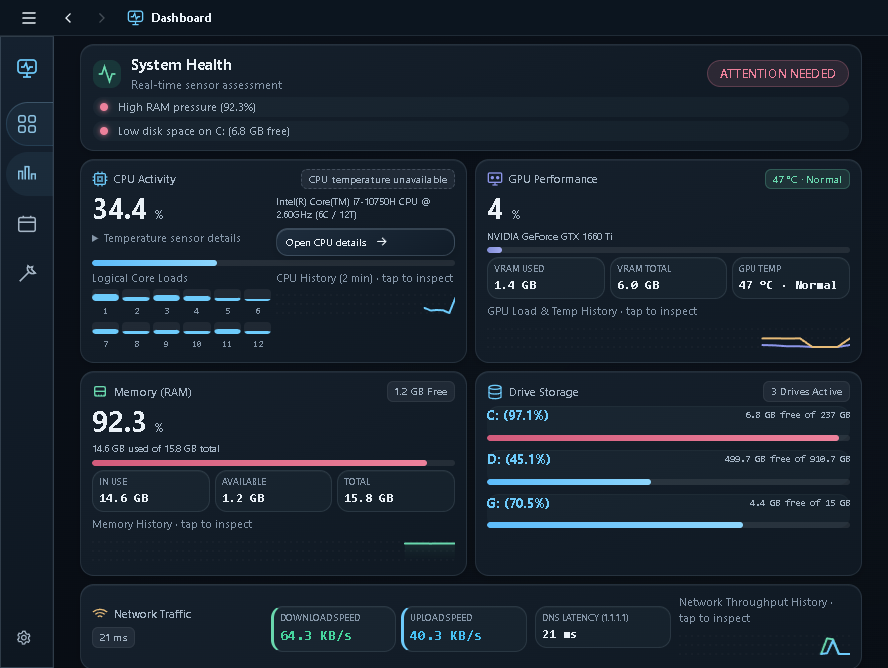
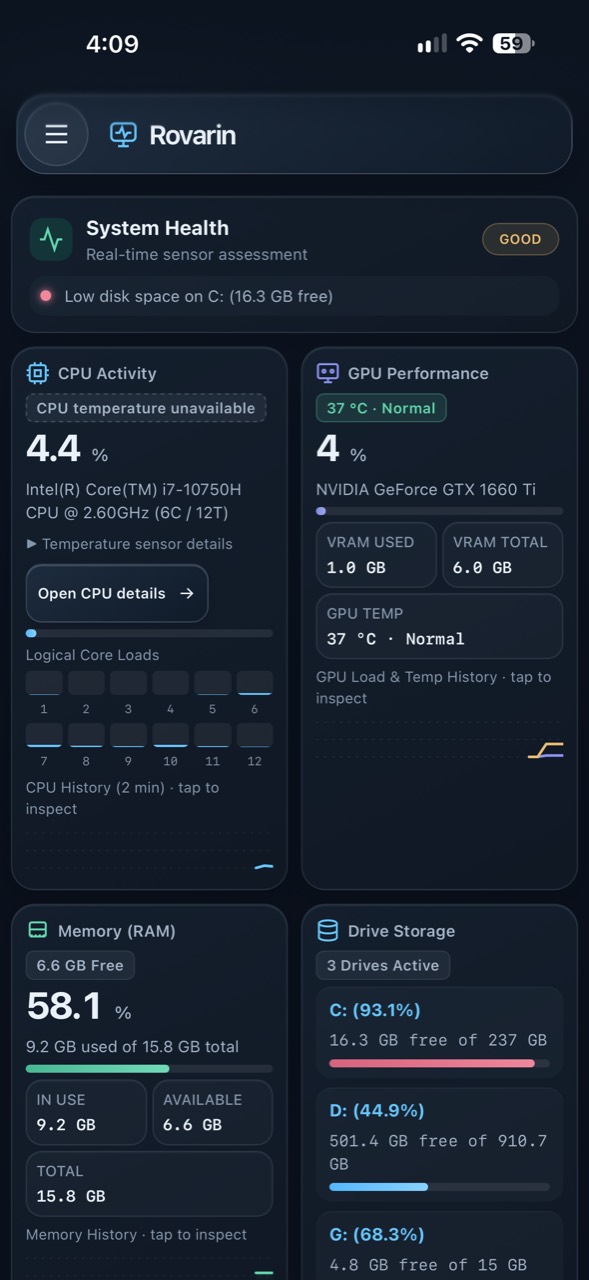
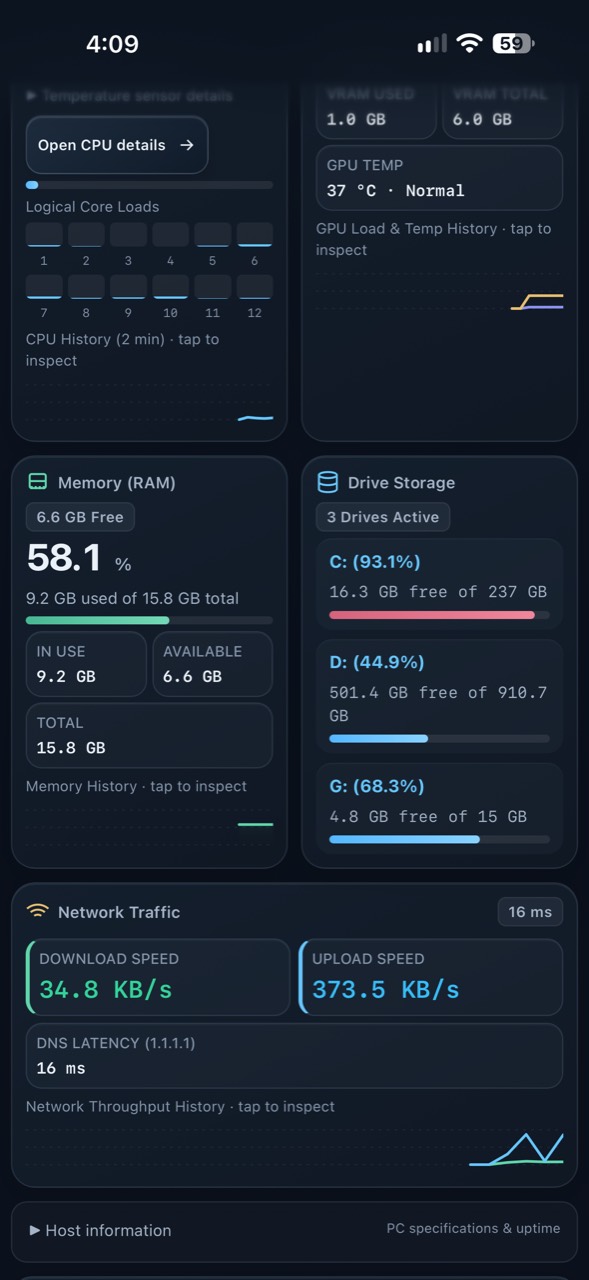
CPU, GPU, RAM, drives and network. Live values, short histories and a health summary that’s easy to scan.
A real desktop home
A standalone Windows app when you’re there. The same dashboard in a supported mobile browser when you’re somewhere else.
Only when it matters
Monitoring adapts to what you’re viewing. No active monitoring view means no continuous telemetry polling.
A helping hand
See apps grouped in a live Processes view, search installed applications in List or Grid, and review supported uninstall and maintenance actions before confirming. Administrator-only repairs stay clearly marked.
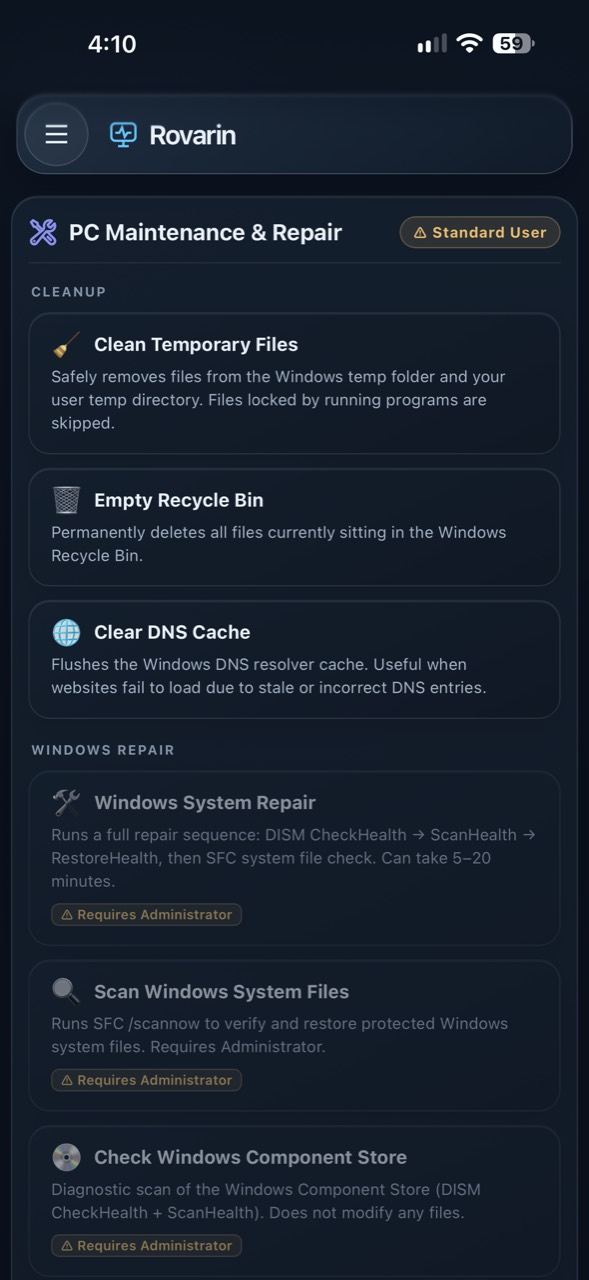
No mock dashboard. This is the app.
Actual app screenshots. Hardware, temperatures and available tools vary by PC.
Your PC. Your connection.
Your PC hosts Rovarin. Tailscale connects your devices for secure remote access, and your Rovarin PIN protects the dashboard.
No router port forwarding. No public dashboard. Local desktop use works without Tailscale.
How access worksLet’s get you connected
Download the Windows installer, open the app and finish local setup. Your PIN is created on your PC.
For remote access, install Tailscale on your PC and mobile device. Sign into the same Tailscale network.
Open the mobile address shown in Rovarin and enter your PIN. Add it to your Home Screen if you like.
Tailscale isn’t bundled. You can skip the remote setup and use Rovarin locally.
A few things to know
Rovarin is an Experimental Alpha. Automated checks passed for 0.2.2, but its real Windows VM upgrade was not completed. Broader hardware and physical-device testing is still ongoing; see the release notes for details. Expect rough edges and please report bugs.
Yes, on your local Windows desktop. Tailscale is needed for secure remote/mobile access in this release.
CPU temperature is optional and hardware-dependent. Rovarin provides an optional Enhanced sensor path using LibreHardwareMonitor and PawnIO. The rest of the dashboard works even when temperature sensors aren’t available.
Yes. Rovarin is source-available under PolyForm Noncommercial 1.0.0, which permits noncommercial use and modification. It isn’t unrestricted open-source software. Earlier and third-party licenses remain intact.
The Alpha installer is currently unsigned, so Windows may show a SmartScreen warning. Review the source, release notes and published SHA-256 before deciding whether to install. We don’t claim signing or reputation guarantees.
Go on. Check on your PC.
Start at your desk. Take the view with you.
Download Rovarin v0.2.2 release notes & checksum ↗